To cancel your Founders Pass Membership (we’re sad to see you go!, please reach ouit to us if this is a financial issue, click here).
Login to your Founders Pass account.
Under the Main Menu at the top of the page select “SUBSCRIBE” then “MY ACCOUNT”.
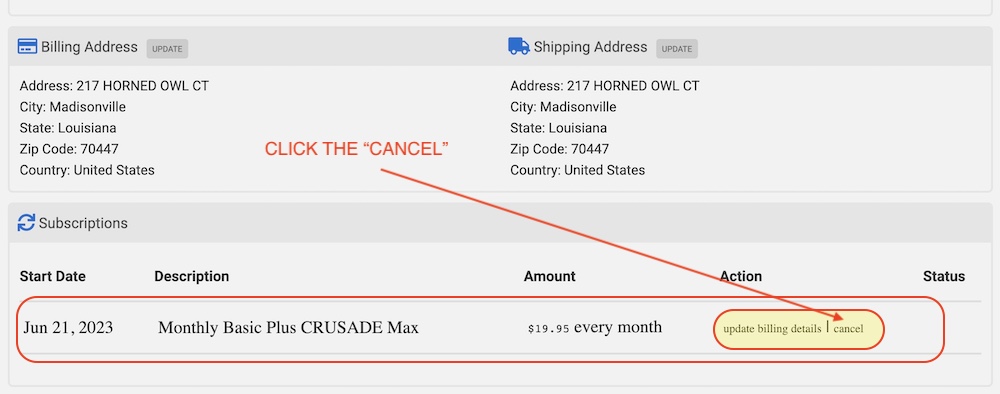
Scroll down until you see the your membership details as shown below.
Click the “cancel” text as shown.
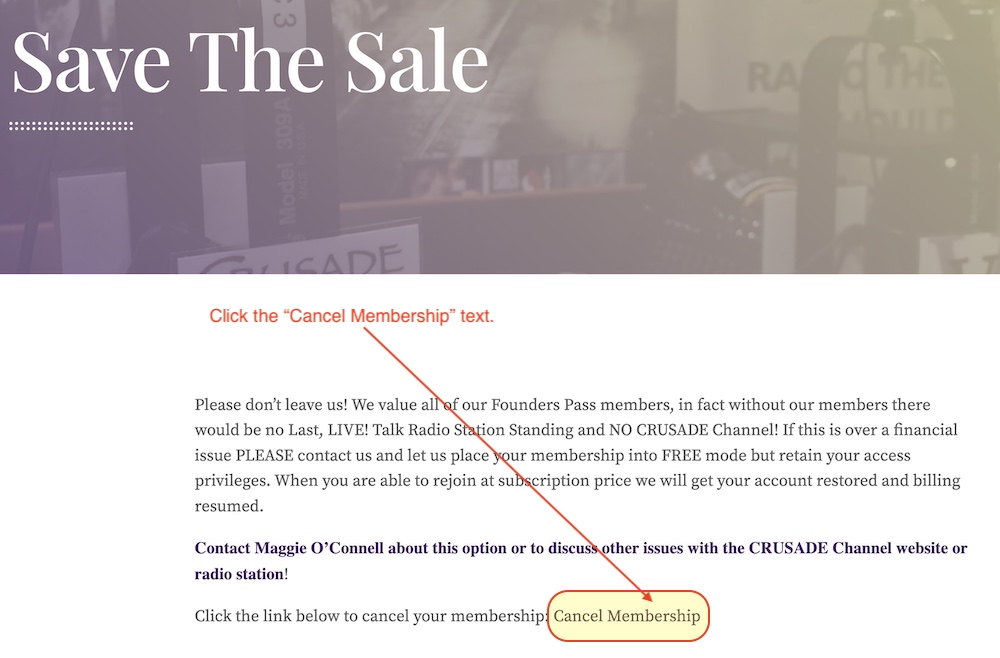
On the Save The Sale page that loads next:
Locate the text “Cancel Membership” and click that text (see below).
Mission accomplished, your Founders Pass is now Cancelled!
HOW TO DELETE YOUR ACCOUNT
To delete your account, which is not reversible, this must be done manually by us. Contact Maggie O’Connell in Customer Service and give her the e-mail address your Founders Pass Membership was attached to. She will then delete your account permanently. Please note that you can re-subscribe using the same email address after account deletion.